The DIMM MarketPlace is reserved for professionals. Not a customer yet? Apply online in 5 minutes.
Click Pro login at the top right, then Request a trade account.
Enter your company and contact details: registered name, name, business type, work email, phone and preferred language.
Enter your address, your country and your VAT number.
Choose the payment terms you would like: SEPA direct debit at 30 days, bank card or bank transfer. For SEPA direct debit, fill in and sign the mandate on screen.
Read the general terms and conditions to the end, sign them on screen and tick I have read and accept the general terms and conditions.
Click Send my request.
You receive an acknowledgement with a request number, and an email to confirm your address: click the link in it. Our team reviews your request within 2 working days, then emails you your sign-in details.
Good to know
Your final payment terms are agreed with our sales team. Your first order is paid when you place it.
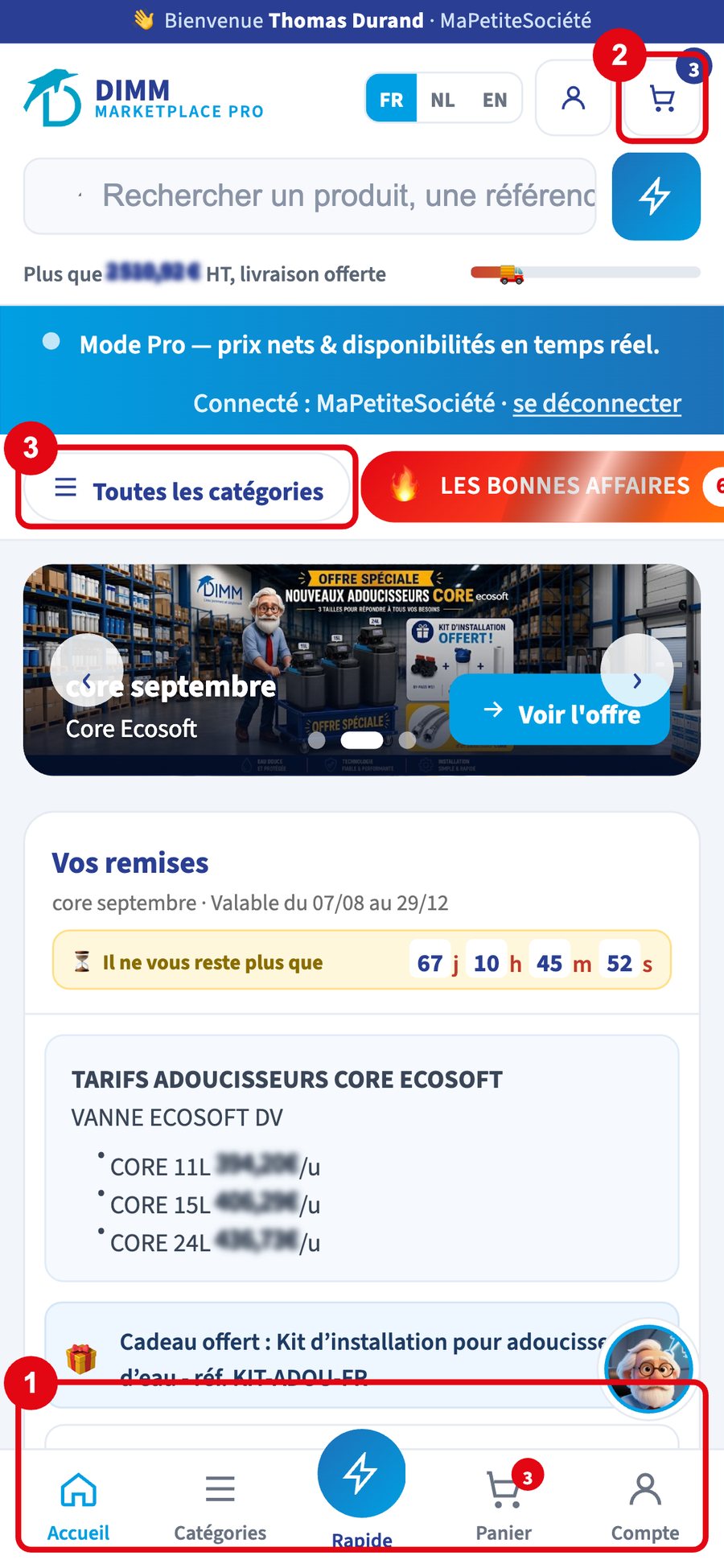
The home page before signing inClick the image to enlarge it
1Pro login: sign in and request an account
2The search bar
3Quick order
4Language choice
The application form: your companyClick the image to enlarge it
1Your company's registered name
2Your business type
3Your work email
Payment terms and the SEPA mandateClick the image to enlarge it
1The payment terms you would like
2The bank account for SEPA direct debit
Accepting the terms and sendingClick the image to enlarge it
1The box to accept the general terms and conditions
Forgotten your password, or never had one? Create a new one in a few clicks.
In the sign-in window, click Forgotten password?.
Enter your work email, then click Send the link.
Open the email you receive and click the link. It is valid for 60 minutes and works only once.
Choose your new password (at least 8 characters), confirm it, then click Save password.
Click Sign in.
You receive an email confirming the change.
Good to know
The link no longer works? It has expired or has already been used: simply request a new one. No email after a few minutes? Check your junk folder, then contact your DIMM sales representative.
Requesting the linkClick the image to enlarge it
1Your work email
2The Send the link button
Choosing your new password, from the link in the emailClick the image to enlarge it
The search bar at the top finds a product by name, brand, category, DIMM item code (ART…) or reference. It copes with typos.
Type at least 2 characters: suggestions appear, grouped by brand and category.
Click a suggestion, or press Enter to see all results.
Narrow down with the filters in the left column (Filters button on a phone): In stock only (ticked by default), New and Good Deals, Categories and Brands, minimum and maximum net price excl. VAT.
Change the order with Sort: best-selling, newest first, relevance, price ascending or descending, name A to Z.
Good to know
No results? Check the spelling, try the reference, or untick In stock only: the item may be temporarily out of stock.
Suggestions as you typeClick the image to enlarge it
You order in three steps, in the cart: your items, delivery, payment.
Add your items with Add, then click Cart.
Your cart: check the quantities, then click Continue to delivery.
Delivery: choose a delivery address or collection on site, with no shipping costs. You can also save a new address and add instructions for the driver. Click View summary.
Payment: check the summary and your payment method (sheet 11).
Click Confirm my order.
You get an order number on screen (CMD-MP-…) and an acknowledgement by email. Your order appears in My account > My orders.
Good to know
Your cart is saved: you find it again on another device, or later.
The gauge at the top shows how much more you need for free delivery.
For any UV lamp, a suitable protective tube is added automatically: it is required for shipping.
Know your references? Quick order fills your cart in one go.
Click Quick order (the lightning bolt) at the top, or Quick on a phone.
Either import your purchase order (Excel, CSV or PDF), type in your lines (reference and quantity, with + Add a line), or paste a list, one line per item in the format REF;QTY, then click Analyse the list.
Check the result: each recognised reference shows its item. Correct any unknown references, otherwise they are ignored.
Click Add everything to cart, then finish like a normal order (sheet 8).
Good to know
Preferably use the DIMM item code (ART…), shown on every product page and on your previous orders.
The Quick order windowClick the image to enlarge it
With every order, you choose between delivery and collection on site.
Delivery: choose one of your addresses, or add one while ordering. To optimise your shipment, our team calculates shipping after your order is confirmed and then lets you know.
Collection on site: no shipping costs. The date from which your order is ready is shown; bring your order number.
Free delivery: above a certain amount, delivery is free. The gauge in the cart shows the amount remaining; it depends on your delivery zone.
Good to know
VAT is calculated according to the country of delivery. For collection, state whether the goods stay in Belgium or go to another European Union country.
Collection on siteClick the image to enlarge it
1Choose collection in the list
2The address and the date from which the order is ready
The free delivery gaugeClick the image to enlarge it
Receive your consumables (cartridges, salt, media) automatically, without having to think about it.
On the page of a consumable, find the Subscription block.
Choose the quantity and frequency: every month, every 3 months or every 6 months.
Click Subscribe.
An email lets you know 5 days before each shipment, with a button to skip that delivery. Follow and cancel your subscriptions at any time in My account > My subscriptions.
Good to know
Subscriptions are reserved for accounts invoiced on credit terms. Contact your DIMM sales representative to benefit.
The Subscription block on a product pageClick the image to enlarge it
1Quantity per shipment
2Frequency
3The Subscribe button
My account > My subscriptionsClick the image to enlarge it
1Your subscription and the date of the next shipment
One billing address, as many delivery addresses as you need: sites, depots, branches.
Open My account > My addresses.
Click Add an address.
Enter the label, the address, the country and, if useful, the on-site contact, their phone and information for the driver.
Click Add address.
Each address can be edited, deleted or set as default: it is the one offered first in the cart.
Good to know
The billing address comes from your customer record and cannot be changed here. To change it, contact your DIMM sales representative. For delivery to the French overseas territories, choose « France » and enter the postcode (971 to 988).
My account > My addressesClick the image to enlarge it
1Add an address
2The default address
3Edit an address
4Set as default
Adding a delivery addressClick the image to enlarge it
Several people from your company can use the MarketPlace, each with their own email and password.
My account > My team lists your colleagues, their access and their ordering right: Can order or View only.
A View only colleague prepares a cart and saves it as a quote. An authorised person then places the order from My quotes.
When a colleague orders, a copy of the order goes to your company's main address.
To add someone, remove access or change a right: contact your DIMM sales representative. The colleague then receives an email invitation, or creates their password with Forgotten password (sheet 3).